MTX 5.0 Beta with Ticket Queuing!
MTX 5.0 Beta introduces a new Ticket Queuing system, six additional data columns for tickets (including SLA Status), control over ticket data column order/display, over-budget notifications, skill management, and tracking of tickets you have viewed.
Ticket Queuing
Ticket Queueing greatly reduces the need to individually schedule tickets with specific dates & times and provides a more dynamic approach to assigning and ordering work.
We recommend team members watch our 3 minute video below covering working on tickets in their queue.
We recommend managers also watch the following 11 minute video detailing how to add and manage tickets in the queue.
Additional Ticket Data Columns
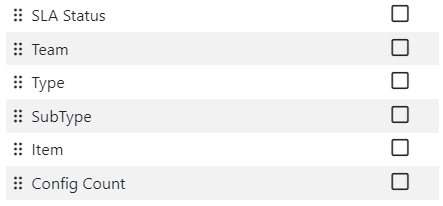
The Ticket's tab in MTX can now include the additional data columns of SLA Status, Team, Source, Type, SubType, Item, and Config Count. In addition, these columns can be reordered and any data columns can be turned on/off as you prefer. You can access this new functionality by clicking on the button under the MTX Tickets tab.
Over-Budget Notification
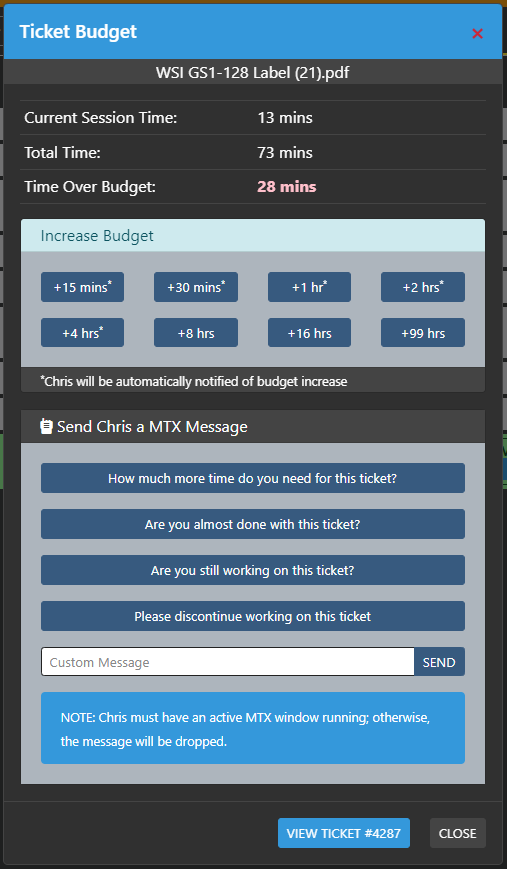
The Availability Board and Time Machine will now indicate if a ticket is over budget. The budget time is determined first by the schedule record assigned. If the user is scheduled for an hour, than the budget will be set for an hour. If there is no pre-existing schedule record, the ticket's Budget Hours value will be used.
When no pre-existing schedule record or ticket budget value has been set, the Default Budget value defined under Nilear -> Settings -> My Tickets will be used. This initial default value is set to 45 minutes.

Tickets you have Viewed
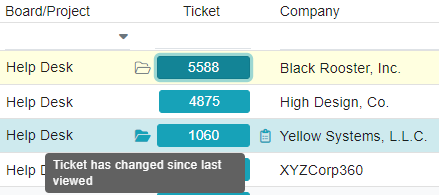
MTX will now include an opened folder icon next to each ticket you have opened and viewed for the day. The icon will turn a solid color when there has been a change to the ticket since you last viewed it that day. In addition, the ticket you last opened will appear highlighted in the Ticket listing.
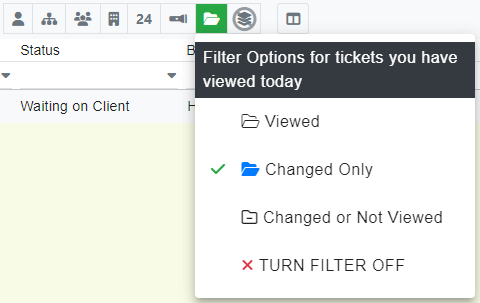
New filter options have also been provided for tickets you have viewed for the day.
 Watch the video on YouTube
 Watch the video on YouTube