FeatureMTX: Tickets
Enter Hours on New Time Entries
The End Time step of the New Time Entry form has a new Hours field, so you can say how long the work took if the current time as the end time is not sufficient. Type a decimal such as 0.25 or 0.5 and the Time End is set to the Time Start plus that many hours, rounded to the nearest minute. Change the Time End instead and the Hours follow it, so you can use whichever is easier.
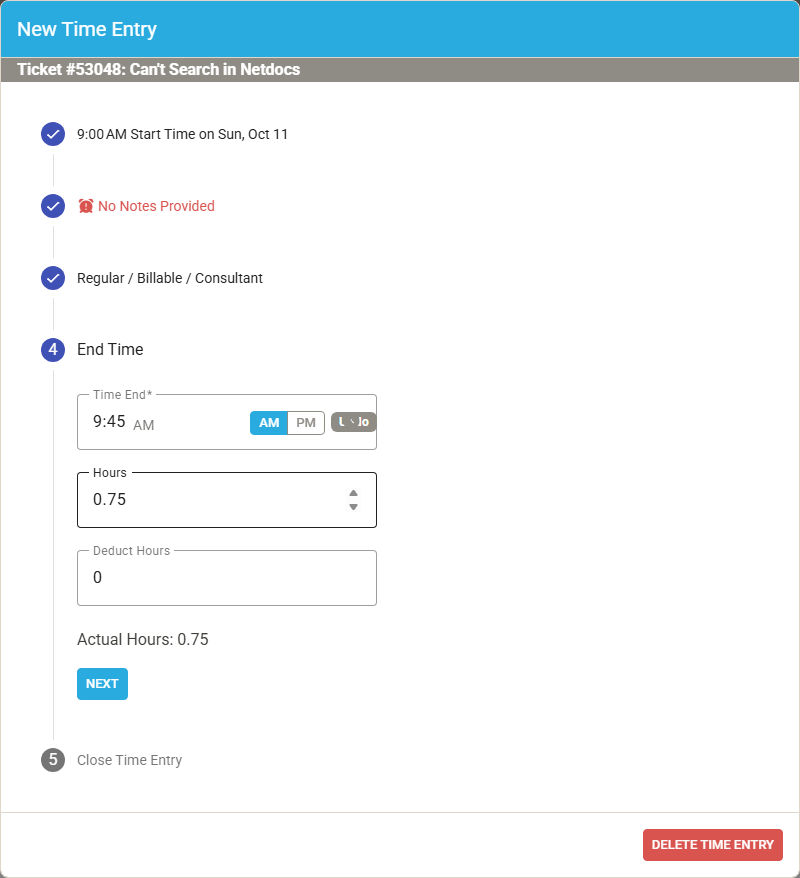
Hours is measured from the Time Start to the Time End, before any Deduct Hours, as in the Work on Ticket Manually Set Time window. A time entry cannot run past midnight, so Hours that would end the entry the next day are refused. A Time End set from Hours is kept when you finish the time entry, rather than being moved to the current time.