FeatureMTX: General
Multi-Value Column Filters
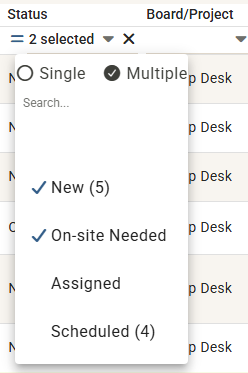
Column filters in the Tickets, My Queue and My Schedule tables can now match more than one value at a time. Open any filter drop-down, switch it from Single to Multiple, then click each value you want. The menu stays open and a check mark marks every value you have selected.
For example, the Board/Project filter can now show the Help Desk and Sales boards together instead of making you choose just one.
- The column header shows "2 selected" - hover over it to see the full list
- The exclude toggle applies to the whole selection, so excluding two boards hides tickets from both
- Switching back to Single keeps the first value you selected
Filters left on Single behave exactly as they did before.