UpdateMTX: Tickets
A Notes Timeline in the Ticket Summary
The Notes tab of the ticket summary has one toolbar and, in the Modern layout, shows the notes as a timeline.
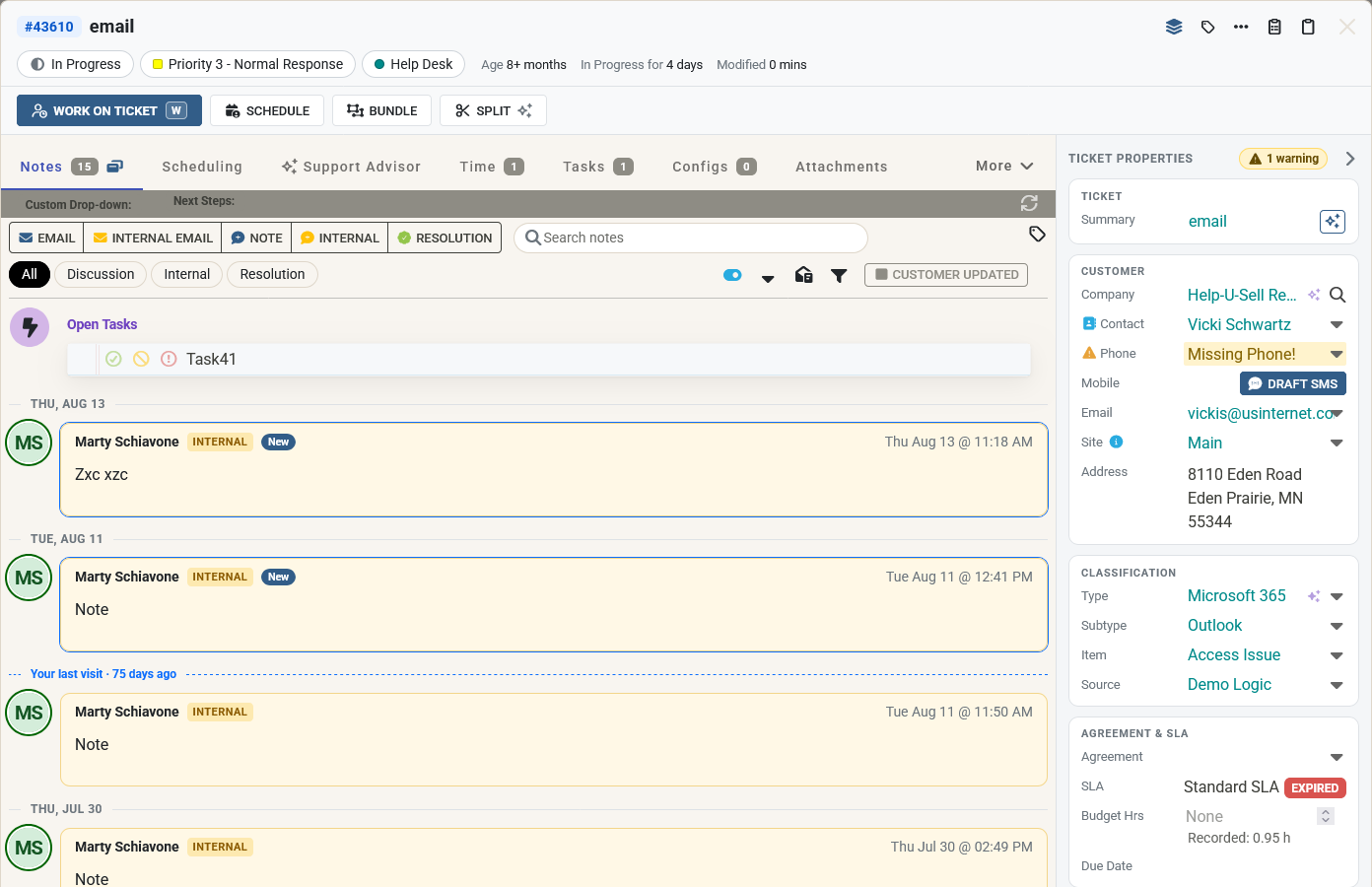
- Add an Email, Internal email, Note, Internal or Resolution note from the toolbar. Resolution notes can now be added from the ticket summary too.
- Search the notes from the toolbar's search box, and show only Discussion, Internal or Resolution notes with the chips. All shows every note again. The filter's hide options are still under its icon.
- Each note is a card with a badge for its kind, and the author's photo or initials ringed in the same colour as their header in the Classic layout. A time entry shows its hours and work type below the note. The first note is labelled Initial description.
- A divider starts each day's notes.
- Notes that others wrote since you last left the ticket are marked New, and a Your last visit line separates them from the notes you have seen. Your browser remembers your visits.
- Press / to search the notes, N to add a note and E to send an email.
Work on Ticket's Notes tab and its notes pop-up show the same timeline, day dividers and New marks, and so do the notes shown when you send an email and Nilear AI's notes.
If you use the Classic layout, your notes keep their look and also get the day dividers and New marks, in the ticket summary and in Work on Ticket.