FeatureMTX: Tickets
Arrange the Ticket Summary's Tabs
You can now put the ticket summary's tabs in the order you like, and choose which are on the tab bar and which are under More.
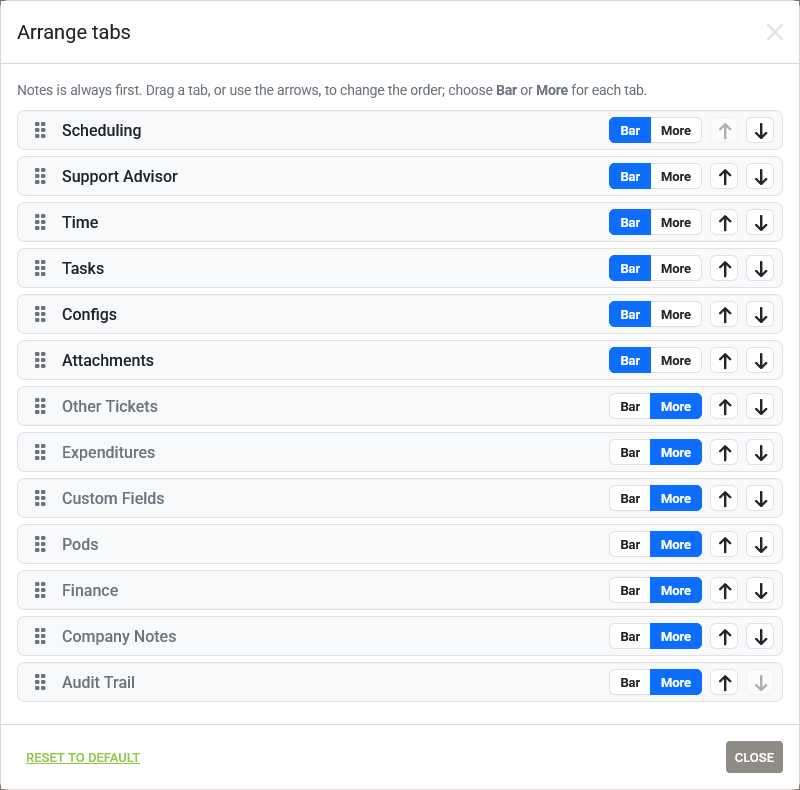
- Open More at the end of the tab bar and choose Arrange tabs….
- Drag a tab by its handle, or use the arrows, to move it. Choose Bar or More for each tab. Notes is always first.
- Changes apply at once. Reset to default puts the tabs back as they were.
- More is always shown now, even when every tab is on the bar, so a pinned tab can always be sent back. The pin beside a tab in the More menu still puts it on the bar.
- Your arrangement is saved for you and follows you wherever you sign in. Tabs you had pinned in this browser are kept.