UpdateMTX: General
Lists in Task Answers
Tasks that end with a colon, such as "Logger:", ask for details, and many teams keep running lists in their answers. Working Notes now helps with that.
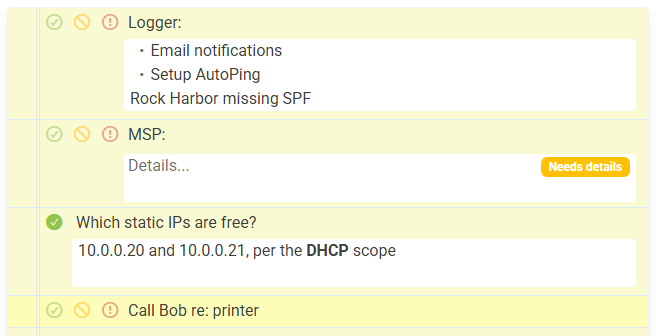
- Enter adds a line. In the answer of a task that ends with a colon, Enter starts a new line and continues a list that starts with
-,*,+or a number. Enter on an empty list item ends the list. Ctrl+Enter (Cmd+Enter on a Mac) marks the task Done and moves to the next line, as Enter did before. Question tasks and the task text keep Enter as it was. - The arrow keys stay in the text. Up and Down move through a multi-line answer and only move to the next box from its first or last line. Down from a task's text goes into its answer.
- Answers show formatted. When you are not editing it, an answer shows its lists, bold and links. Click it to edit. Hover over a list item and click × to remove it.
- Only a trailing colon or question mark adds an answer box. A colon in the middle of the text, such as "Call Bob re: printer", no longer does. A colon task's empty box now reads Details....
- Unanswered tasks are marked. An open colon or question task without an answer shows Needs details or Needs answer. Wrap-up lists these tasks, but you can still end the session.