FeatureMTX: Tickets
Filters Panel in Ticket Search
Ticket Search on the Tickets tab now has a Filters button. It opens a panel above the results with every filter in one labeled form.
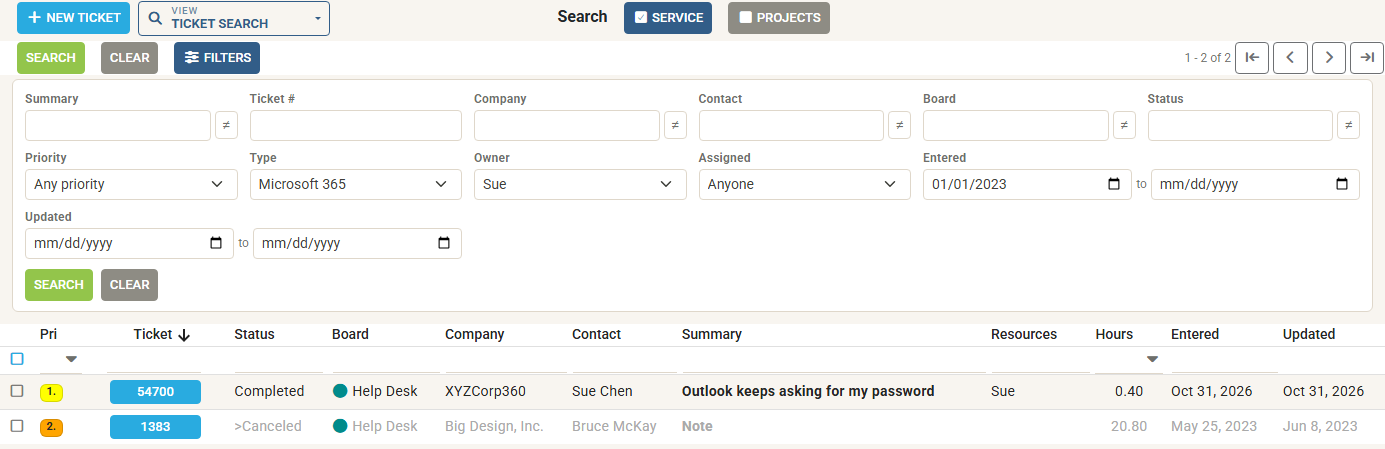
- The column filters, side by side. Summary, Ticket #, Company, Contact, Board, Status and Priority are the same filters as in the column headers. Type in either place and the other follows.
- New filters. Narrow a search by Type, Owner, Assigned, and by the days a ticket was Entered or last Updated. Leave either end of a date range empty to search from or up to a day.
- One scope for Owner. Owner is available while either Service or Projects is selected, not both.
- Updated column. On wide screens a new Updated column shows each ticket's last update and sorts newest first.
Press Enter or Search to search, and Clear empties the panel and the column filters. MTX remembers whether you left the panel open, in the same browser. While it is closed, the button shows how many of the new filters are set.