FeatureMTX: Tickets
Ticket Properties on Top or on the Right
On wide screens you can now choose where the ticket summary shows its properties: Top puts them above the notes, as before the side panel, and Right keeps them in the panel beside the notes. The Top | Right switch is at the end of the Work on Ticket row, or, while on Top, beside Ticket properties next to Cards | List.
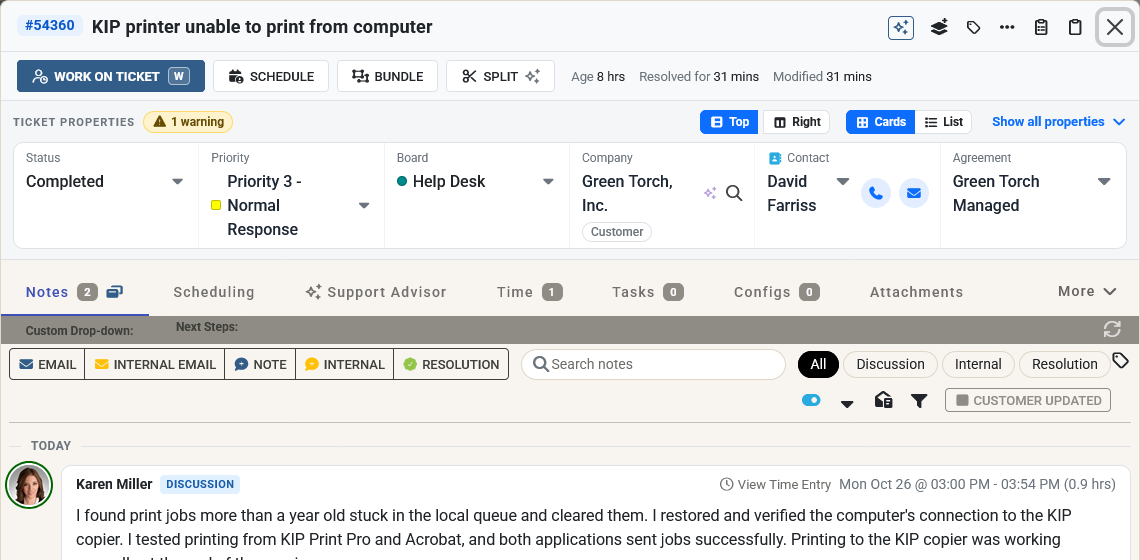
- Top suits triage. Status, priority and board move from the header into the properties, with the company, contact and agreement in the same row. Choose Show all properties for every field.
- With Top, the ticket's age, the time in its current state and the last change are shown on the Work on Ticket row. The ticket summary is also a little narrower, so the notes stay easy to read.
- MTX remembers your choice wherever you sign in. Below 1200 px wide the properties are always at the top, and the choice still decides where status, priority and board are shown.
- The ticket's summary is now edited in the title at the top of the ticket summary, instead of in a Summary field. Point at the title or click it to change it. Esc undoes a change you have not saved yet.