FeatureMTX: Tickets
Choose and Arrange the Ticket Properties
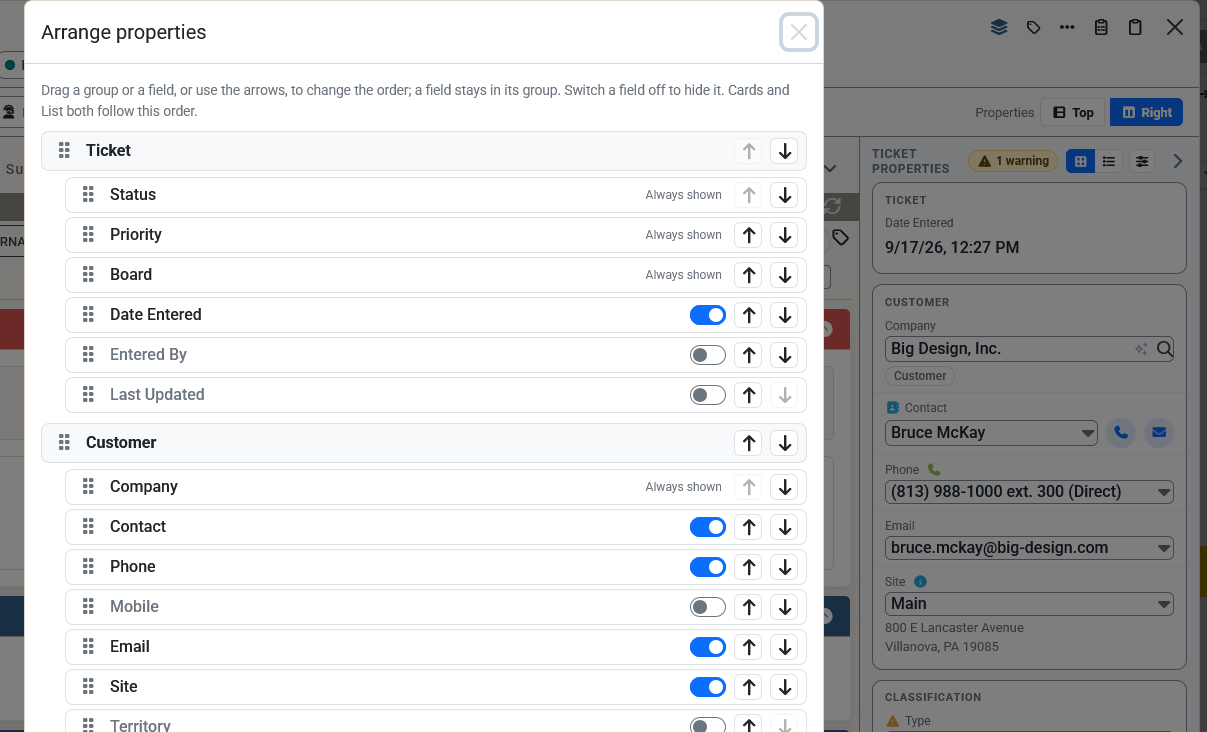
You can now decide which fields the ticket properties show, and in what order. Choose Arrange properties, the button beside Cards | List in the properties panel, the properties band and Work on Ticket's Ticket Properties tab.
- Hide what you never use. Switch a field off, for example Mobile or Budget Hrs. Company, Status, Priority and Board are always shown.
- Add fields. Switch on Date Entered, Entered By, Last Updated, Territory, Severity, Impact, Work Role, Work Type or Resources, or any of the ticket's ConnectWise custom fields, which you can edit right there.
- Put them in order. Drag a group or a field, or use the arrows, to move it. A field stays in its group.
- Cards and List both follow it. Your arrangement is saved for you, on every computer. Reset to default brings back the usual layout.
If a field you hid has a warning, such as a missing type, the warning count still includes it.