FeatureMTX: Tickets
Choose Columns and Row Height From One Menu
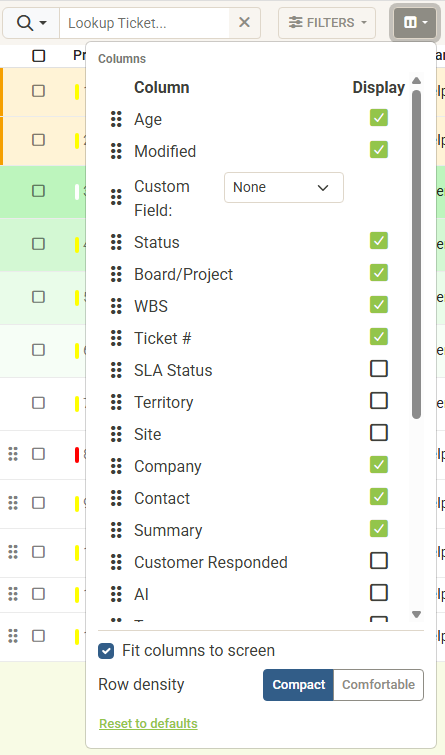
The Columns button beside Filters on the Tickets and My Queue tabs now opens a menu instead of a window, so you see each change in the list as you make it.
- Columns. Drag a column to move it, tick or untick it to show or hide it, and pick a custom field, as before. The list updates at once, and MTX saves your choice when you close the menu.
- Fit columns to screen. The setting that used to be called Responsive Web Design Columns. Untick it to show every column you have chosen, with sideways scrolling.
- Row density. Compact keeps rows as they have always been. Comfortable makes rows taller, wraps long summaries to two lines and gives the status, board and schedule buttons in each row more room. Your choice follows you to any device.
- Reset to defaults also returns rows to Compact.