Companies: Create & Edit
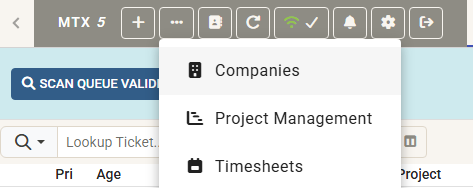
A new Companies option has been added to the View Additional Options menu. It opens full screen with the Company Lookup you already know - search and Quick Picks - alongside a NEW COMPANY button, so a company can be created without leaving MTX.
Selecting a company opens it full screen with everything about it in one place:
- Company: edit the company itself - name, phone, web site, social links, address, Company ID, status, territory, market, Company Types and ConnectWise Custom Fields
- Contacts: the company's address book
- Tickets: its open and closed tickets
- Configs: its configurations
- Sites: create and edit sites, including the address, tax code, time zone and calendar
- Teams: add, change and remove team members, choosing either a Member or one of the company's Contacts for each role
Creating from a domain. Creating a company starts by asking for its domain. The company's public website is then read to fill in the form for you - name, Company ID, phone, web site, Facebook, LinkedIn and Twitter/X, the address and the market - so most of a new company is entered before you type anything. You can also add its first Contact at the same time, either as the Primary Contact or as a contact only.
- Catches duplicates first: before the form opens you are shown any company that might already be this one, matched on website, on name, or on a similar name - inactive companies included - so a second copy is not created by accident
- Never in the way: skip the domain for a blank form, and a site that cannot be read still opens the form rather than stopping you
Editing works a little differently to the rest of MTX: changes are collected and written together when you press SAVE CHANGES, and the bar at the bottom of the form keeps a running count of what is still unsaved.