UpdateMTX: Tickets
Easier-to-Read Ticket Properties
Ticket properties are easier to read in the ticket summary's panel and in Work on Ticket.
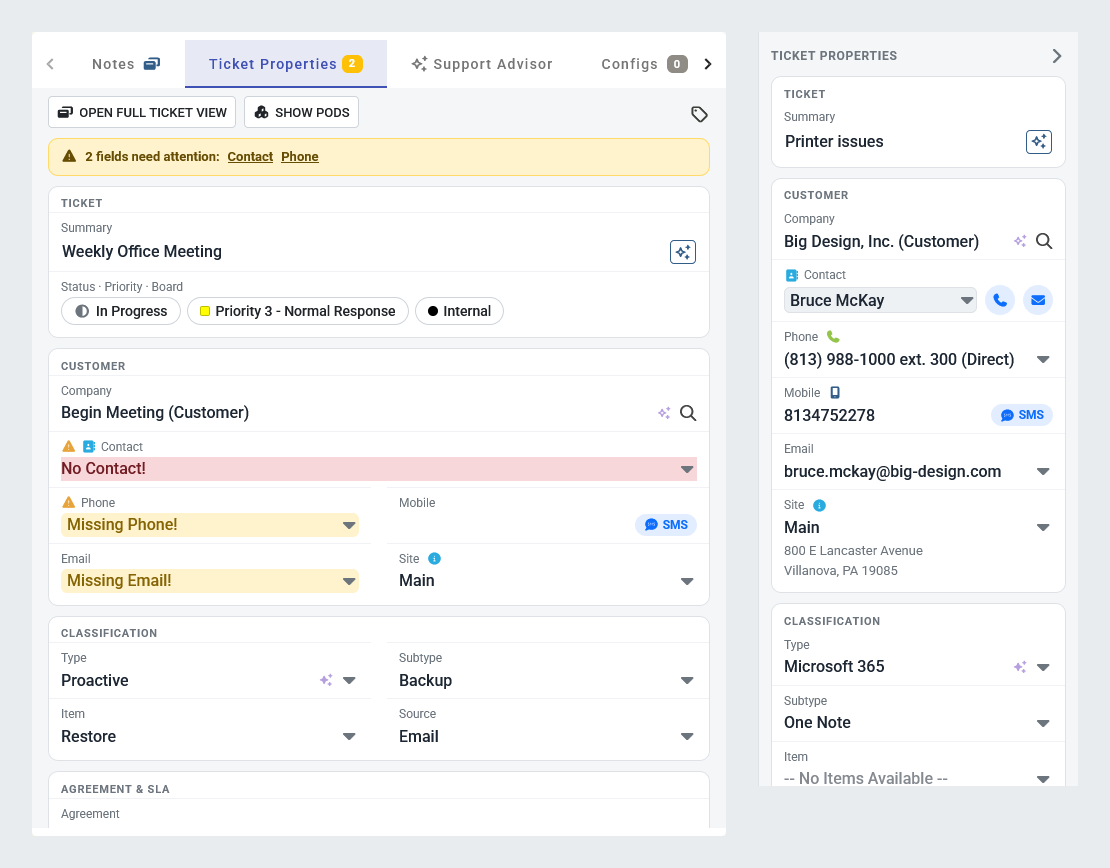
- Each property shows its label above its value, so values such as the company, the contact and the agreement are no longer cut off.
- Values read as plain text. Point at one to see its editor, then change it as before.
- Draft SMS is a small SMS chip beside the mobile number, and the site's address is shown under the site.
- The company's types, such as Customer and Vendor, are shown as small labels under its name.
- Call or email the contact from the buttons beside their name.
- In Work on Ticket, Ticket Properties uses the same grouped cards as the ticket summary. The status, priority and board are pills at the top, and fields sit two to a row when there is room.
- When fields need attention, a strip at the top of Ticket Properties names them. Choose one to go to it.