UpdateMTX: Tickets
Ticket Properties Beside the Notes
On screens 1200 px wide and wider, the ticket summary is wider and shows the ticket's properties in a panel to the right of the notes, instead of the band above them. You can read the notes and change a field without expanding or collapsing anything.
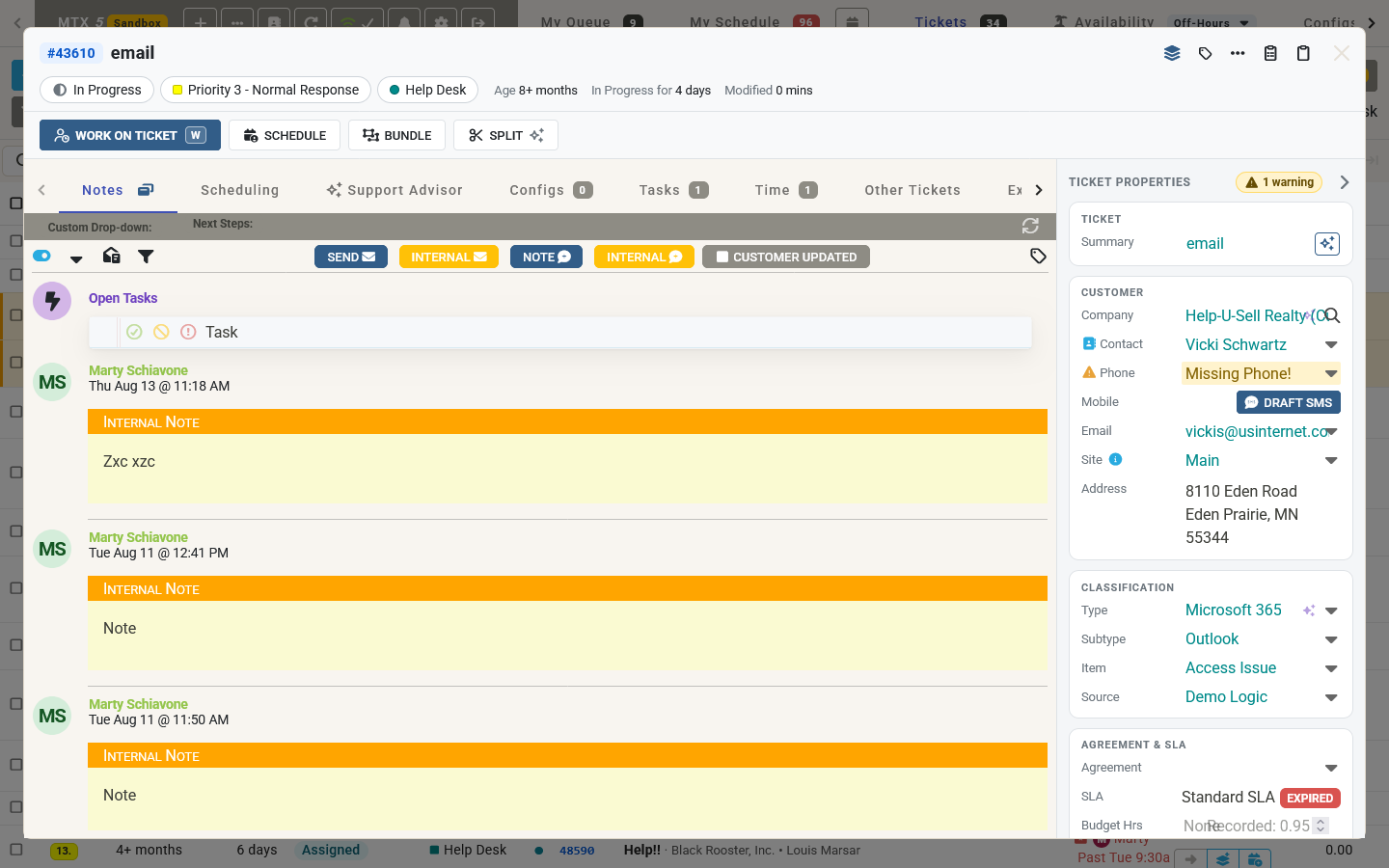
- The fields are grouped into Ticket, Customer, Classification, Agreement & SLA, People and Links. Each works as it did in the band.
- When a field needs attention, for example a contact without a phone number, the panel's header shows how many warnings there are and the field is marked.
- The ticket's Team can now be changed in the panel as well as on the Scheduling tab.
- SLA counts down to the current goal, for example "Resolve in 5h 40m", on a bar coloured like the SLA badge.
- Budget Hrs shows the hours used against the budget, for example "1.5 of 3.0 h". The bar turns amber from 80% and red over budget.
- Due Date shows how far off it is, for example "in 3 days" or "2 days overdue".
- The arrow in the panel's header collapses it to a thin strip beside the notes; the strip's arrow brings it back. Your browser remembers your choice, and a new ticket always opens with the panel shown.
On narrower screens the properties stay in the band above the tabs.